
OpenCart 4 stores can offer XRP as an individual coin, paid on a QR page on your own store, or on the hosted multi-coin page. XRP settles in seconds with tiny fees. PayGate.to supports native XRP on the XRP Ledger: each order gets a one-time XRP address (no tag needed by the customer), and the XRP is forwarded to your own wallet, including your destination tag if your account needs one.
Step 1: Get an XRP wallet address
You need an XRP address you control (r…), from Trust Wallet or OKX Web3 Wallet. If your account needs a tag, write it as r…?dt=TAG or use an X-address. Details: Get an XRP address with a destination tag.
Step 2: Install or update the OpenCart plugin
Upload paygatedottocrypto.ocmod.zip under Extensions › Installer (XRP needs version 1.0.1 or newer), then install PayGate.to Crypto (Individual Coins) and/or (Multicoin) under Extensions › Extensions › Payments.
Step 3: Paste your XRP wallet
Open Extensions › Extensions › Payments, pencil icon.
- PayGate.to Crypto (Multicoin): paste your XRP wallet into XRP Wallet (XRP Ledger), turn Status on and Save.
- PayGate.to Crypto (Individual Coins): tick XRP in Accepted Coins, paste the same wallet, turn Status on and Save.

Step 4: What your customer sees
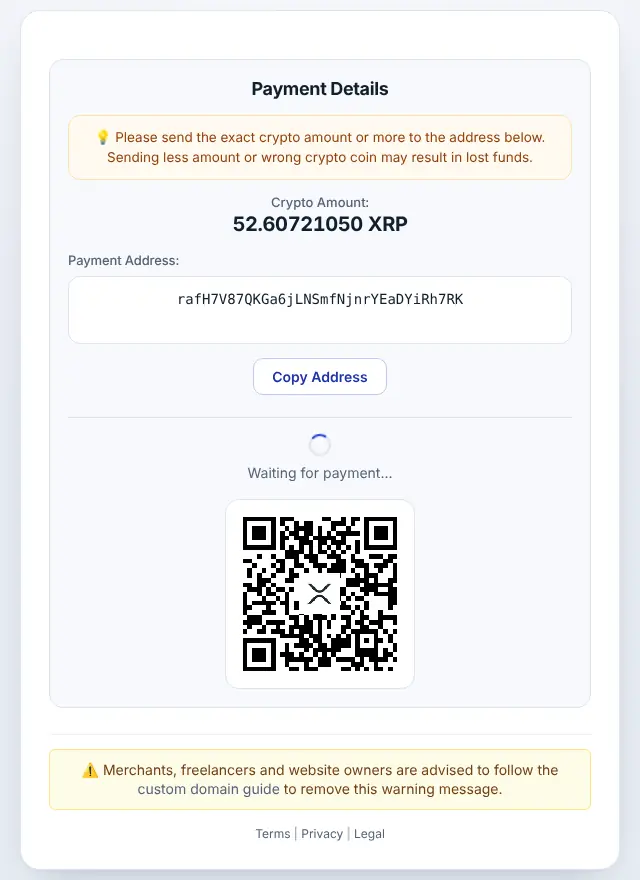
The customer chooses XRP, gets the exact amount converted from your order total, a one-time address and a QR code.
Step 5: Order completed automatically
When the payment is confirmed, the order moves to your paid status, and the admin order page shows a PayGate.to tab with every detail.
XRP on OpenCart: good to know
- Minimum: 2 XRP at the time of writing (live minimums). A new address needs 1 XRP reserve; the first payout covers it.
- Timing: XRP Ledger payments are final in a few seconds.
- Callbacks:
address_outlists your payout asr…?dt=TAG, even if you entered an X-address. - On the QR page the amount is guaranteed for 3 hours.
- If a customer sends less, they can send the rest to the same address and both payments are added up.
- Confirmations work with SEO URLs and still reach the store in maintenance mode.
- Order statuses: Pending → Processing; Failed if underpaid (statuses configurable).
Frequently asked questions
Do customers need to enter a destination tag?
No. They pay a one-time address without a tag. Only your payout wallet may have one.
Can I paste an X-address into the field?
Yes. The plugin accepts r…, r…?dt=TAG and mainnet X-addresses.
Do I need an account or API key?
No. The plugin only needs your public wallet addresses. Neither you nor your customers register with PayGate.to.
Which other platforms support XRP?
WooCommerce · Easy Digital Downloads · WHMCS · FOSSBilling · Magento · PrestaShop · Paymenter. See Accept XRP payments for the overview.