
PrestaShop shops can offer Monero as an individual coin, paid with a QR code on the order confirmation page, or on the hosted multi-coin page. Monero (XMR) keeps amounts, senders and receivers private on its blockchain, which is exactly why many customers prefer it. With PayGate.to, each order gets a one-time Monero address and the XMR is forwarded to your own Monero wallet once it unlocks.
Step 1: Get a Monero wallet address
You need a Monero address you control: a main address (4…) or a subaddress (8…), 95 characters. Get one from Feather Wallet on a computer or Cake Wallet on a phone. We confirmed that PayGate.to accepts subaddresses as payout wallets.
Step 2: Install or update the PrestaShop plugin
Upload cryptopayment_gateway.zip under Modules › Module Manager › Upload a module, then click Configure.
Step 3: Paste your Monero wallet
Open Modules › Module Manager › Crypto Payment Gateway (PayGate.to) › Configure.
- Multicoin: paste your Monero wallet into Monero Wallet (XMR) and click Save.
- Individual coins: tick Monero in Accepted Coins with the same wallet. Customers see the QR code on the order confirmation page and under My account › Order history.

Step 4: What your customer sees
The customer chooses Monero, gets the exact amount converted from your order total, a one-time address and a QR code.
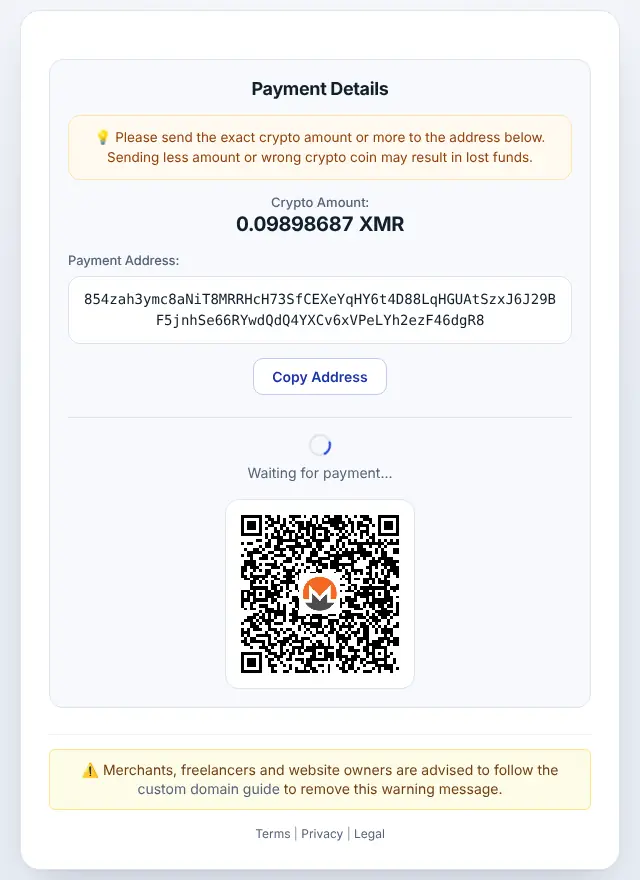
Step 5: Order completed automatically
When the payment is confirmed, the order moves from Awaiting crypto payment to Payment accepted, and the admin order page shows a Crypto payment (PayGate.to) block.
Monero on PrestaShop: good to know
- Minimum: 0.01 XMR at the time of writing (live minimums).
- Timing: Monero blocks arrive every ~2 minutes and received funds unlock after 10 blocks (~20 minutes) before forwarding.
- Privacy: customers never see your wallet address; outsiders can't link the payment to it on the blockchain.
- With SSL, turn on both Enable SSL and Enable SSL on all pages.
- Underpaid orders get Payment error; for individual coins the payment box asks the customer to send the rest to the same address.
- Order statuses: Awaiting crypto payment → Payment accepted; Payment error if underpaid.
Frequently asked questions
Can I use a Monero subaddress?
Yes. Subaddresses (8…) and main addresses (4…) both work as payout wallets.
Why does the order take about 20 minutes to complete?
Monero locks received funds for 10 blocks. The customer has paid; forwarding waits for the unlock, then the order updates automatically.
Do I need an account or API key?
No. The plugin only needs your public wallet addresses. Neither you nor your customers register with PayGate.to.
Which other platforms support Monero?
WooCommerce · Easy Digital Downloads · WHMCS · FOSSBilling · Magento · OpenCart · Paymenter. See Accept Monero (XMR) payments for the overview.