
The free PayGateCrypto extension for Paymenter 1.4 or newer (tested on 1.5.9) lets clients pay invoices on the hosted multi-coin page. It installs from the admin area, no server access needed, and forwards every payment to your own wallets. Fees: 1% plus blockchain fees. Illustrated guide: Paymenter crypto page.
Requirements
Paymenter reachable at its public https address, with Settings › General › App URL set to that address (confirmations go to /extensions/gateways/paygatecrypto/callback).
Setup
- Download the extension ZIP from the Paymenter crypto page and keep it zipped.
- Extensions › Available Extensions › Ready to Install / Upload, Upload Extension, choose the ZIP, Submit.
- Gateways › New gateway: enter a Name clients will see (for example "Crypto (Bitcoin, USDT, Solana…)"), choose PayGateCrypto, and fill in your network wallets.
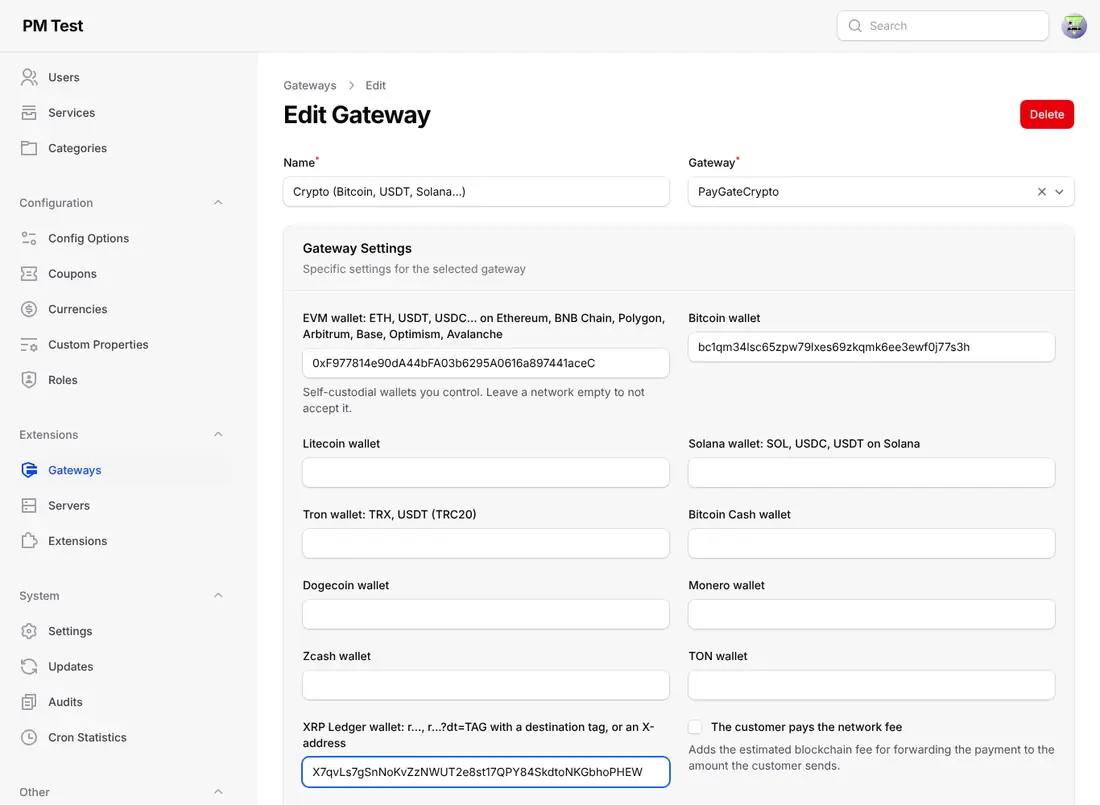
- Optional: The customer pays the network fee, Underpayment tolerance (default 2%), dedicated API endpoint and white-label settings. Click Create.
- Test: open an invoice, Pay, choose the crypto method, Pay Now, pick a coin on the hosted page.
If uploads are blocked on your server, copy PayGateCrypto.php and the keys folder to extensions/Gateways/PayGateCrypto/ instead.
Where to see payments
Each confirmed payment becomes a transaction with its blockchain transaction ID, under Invoice › Invoice Transactions, on the admin invoice and on the client's invoice page.
Coin guides for Paymenter
Monero · XRP · Bitcoin · USDT · USDC
Frequently asked questions
The invoice isn't marked paid after payment. Why?
Check that App URL is your public https address and that the callback path is reachable from the internet.
Can clients pay part of an invoice?
Within your underpayment tolerance the invoice is paid; larger shortfalls are recorded as a transaction for you to settle.