
The free PayGate.to Crypto Payments plugin for Easy Digital Downloads (EDD) sends customers to a hosted multi-coin page where they pick any coin you accept. Payments are forwarded to your own wallets, and the order completes automatically. Fees: 1% plus blockchain fees. Illustrated install guide: EDD crypto plugin page.
Requirements
- Easy Digital Downloads 3.7 or newer and WordPress 6.2 or newer; PHP 7.4+ with the
opensslextension. - Your site reachable at its public https address (confirmations go to
index.php?edd-listener=paygate_crypto). - A self-custodial wallet for each network you accept.
Setup
- Download the plugin ZIP from the EDD crypto plugin page and keep it zipped.
- Install: Plugins › Add New Plugin › Upload Plugin, choose the ZIP, Install Now, Activate Plugin.
- Turn it on: Downloads › Settings › Payments › General, switch on PayGate.to Crypto Payments under Active Gateways, save.
- Enter your wallets in the PayGate.to Crypto tab: one per network, empty to disable.
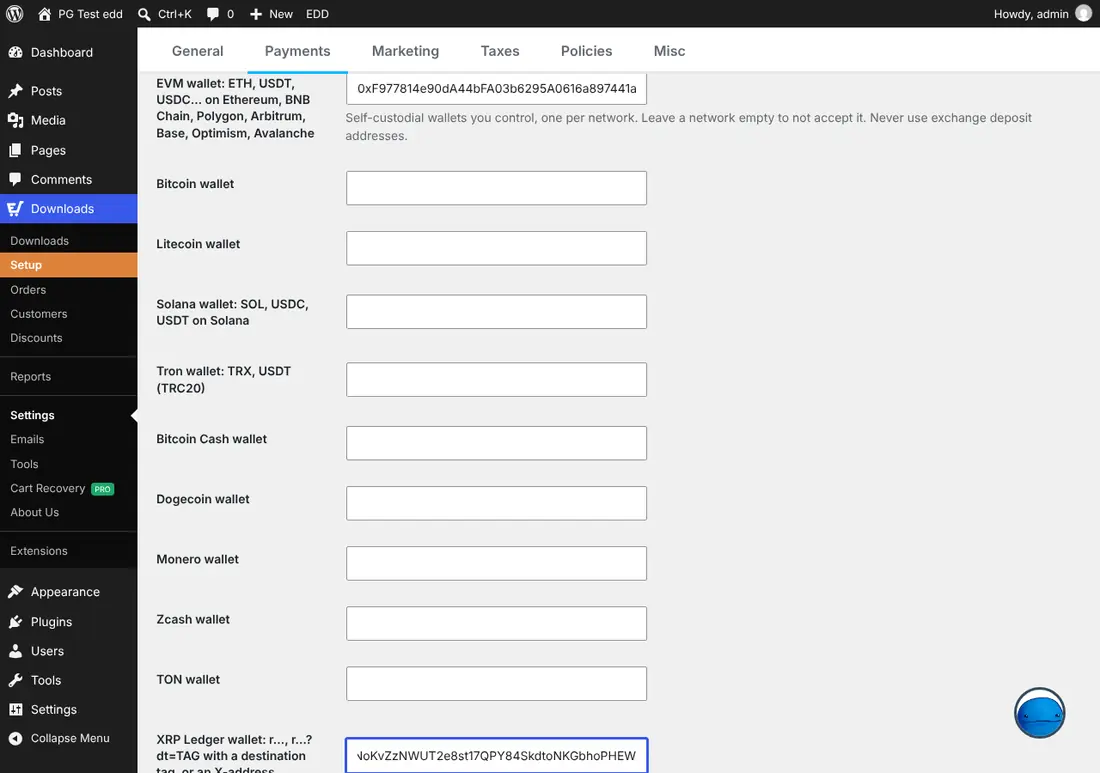
- Optional: The customer pays the network fee, Underpayment tolerance (default 2%), a dedicated API endpoint and white-label settings.
- Test a purchase: the customer chooses Crypto (Bitcoin, USDT, Solana…), clicks Purchase and picks a coin on the hosted page.
Security built in
- Every confirmation is signed by PayGate.to and checked against the bundled public key.
- Every callback URL is signed with a secret stored in your database.
- Repeated or simultaneous confirmations are recorded once.
- At least 90% of the payout must go to your configured wallets before an order completes.
Where to see payments
Under Downloads › Orders, completed crypto orders show the blockchain transaction ID, and every confirmation is in the order notes.
| Order | Meaning |
|---|---|
| Completed, "received … TXID" | Paid |
| On Hold, "underpaid" | Less arrived than due beyond your tolerance; the funds are in your wallet |
| On Hold, "unknown coin" | An unexpected coin arrived; check before releasing |
| Note "extra payment" | The customer paid again after completion; refund if needed |
Coin guides for Easy Digital Downloads
Monero · XRP · Bitcoin · USDT · USDC · Solana
Frequently asked questions
Is there an on-site QR code mode?
The EDD plugin uses the hosted multi-coin page, which shows the QR code, amount and address. It works for every coin you enable.
What if the coin's price moves while the payment confirms?
When the confirmation arrives, the plugin converts the order total into the paid coin at the current rate and compares it with what was received. For volatile coins, raise the underpayment tolerance a little, or encourage stablecoins.
How do I update the plugin?
Upload the new ZIP the same way; WordPress offers to replace the current version and keeps your settings.