
Want crypto too? Our free Easy Digital Downloads crypto module is the only crypto payment gateway with instant payouts for Solana, Monero, Zcash and Bitcoin. Read the Easy Digital Downloads crypto guide.
What you need before you start
- Easy Digital Downloads 3.7 or newer on WordPress 6.2 or newer (tested on EDD 3.7.1.1 and WordPress 7.1.3).
- Your site reachable at its public https address. Payment confirmations are sent to
https://your-site/index.php?edd-listener=paygate_card. - A USDC wallet address on Polygon (starts with
0x). Step 1 shows how.
Check that your business is allowed first: see the prohibited businesses list.
Get your USDC (Polygon) payout wallet
Card payments are paid out to a USDC wallet on the Polygon network. That is a normal wallet address that starts with 0x. Payouts may arrive as USDC, USDT (Polygon or BEP-20), ETH or the POL native token, and the same address receives all of them.
- Use a self-custodial wallet that only you control, for example Trust Wallet, MetaMask, Rabby or a hardware wallet. You can create a free one in a few minutes with the Trust Wallet app on your phone.
- Copy your Polygon address (it starts with
0x, 42 characters).
Never use an exchange deposit address (Binance, Coinbase, Kraken and so on). Exchanges can freeze or lose payouts sent to deposit addresses. Also do not paste the USDC token contract address: it is not a wallet.
Download the plugin
Download the latest version from our GitHub repository: EDD-Instant-Payment-Gateway-main.zip. Keep it zipped. The plugin is free and open source; you can read every line of code on GitHub.
Install and activate the plugin
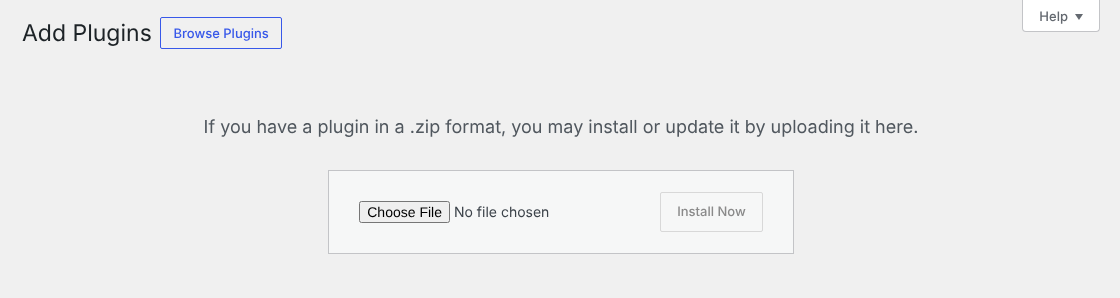
- In WordPress, open Plugins › Add New Plugin and click Upload Plugin.
- Choose
EDD-Instant-Payment-Gateway-main.zip(do not unzip it) and click Install Now. - Click Activate Plugin. PayGate.to Card Payments for Easy Digital Downloads now appears in your plugin list.
Turn on the card gateway
Open Downloads › Settings › Payments › General. Under Active Gateways, switch on PayGate.to Card Payments. You can also pick it as the Default Gateway. Click Save Changes.
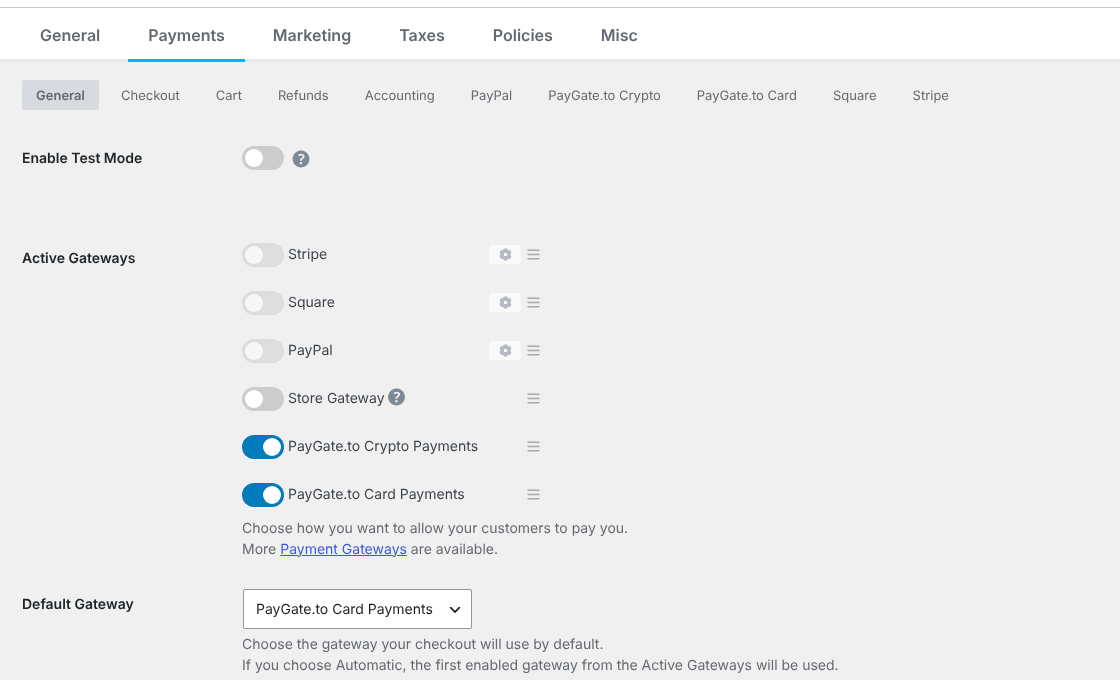
Leave Enable Test Mode off: PayGate.to has no test mode, small real payments are the way to test.
Paste your wallet
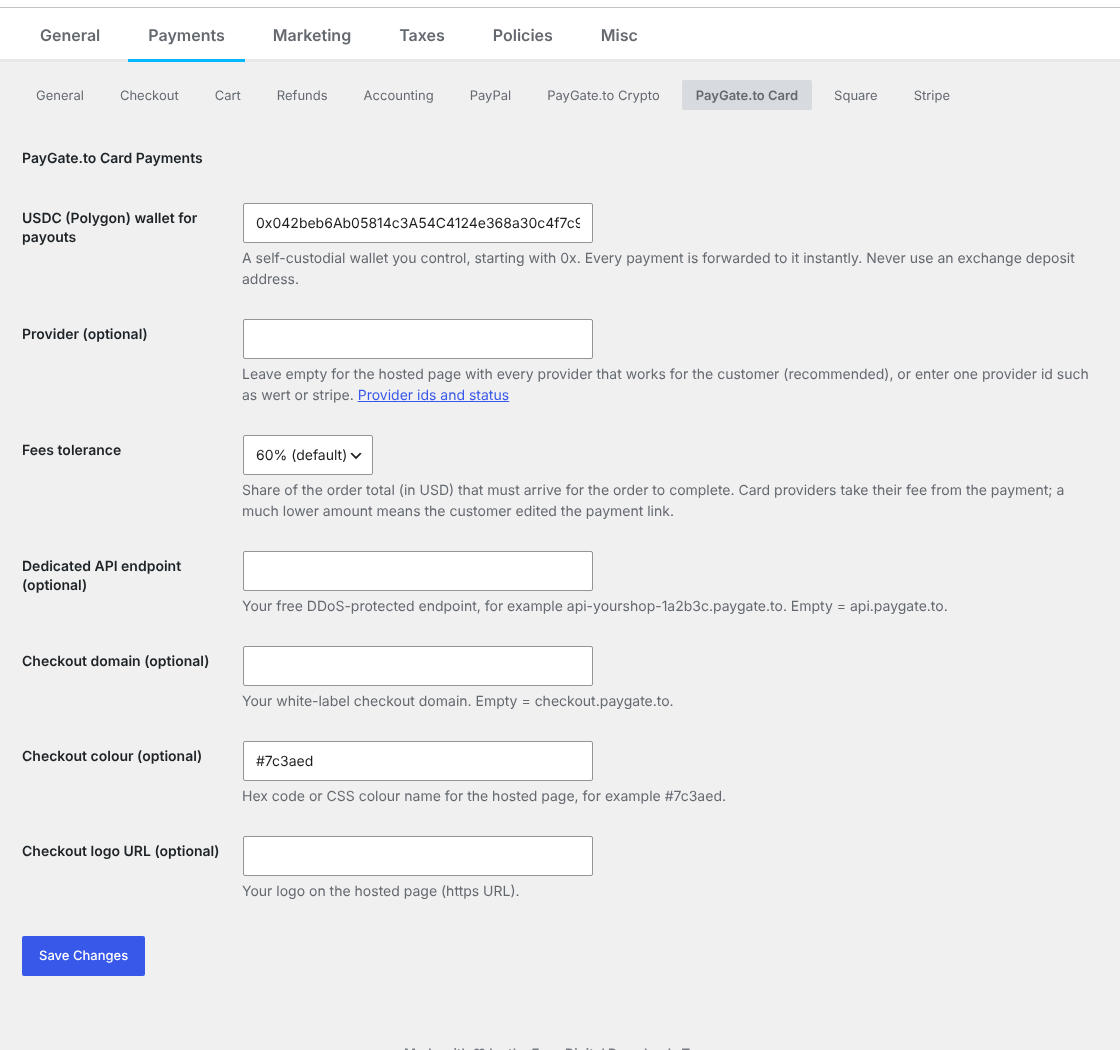
On the same page, open the PayGate.to Card tab and fill in the settings:
| Setting | What to enter |
|---|---|
| USDC (Polygon) wallet for payouts Required | Your Polygon address starting with 0x. |
| Provider | Leave empty for the hosted page with every provider that works for the customer (recommended), or enter one provider id such as wert or stripe (provider list). |
| Fees tolerance | Share of the order total (in USD) that must arrive for the order to complete. Providers take a fee, and a much lower amount means the customer edited the payment link. Default 60%. |
| Dedicated API endpoint | Optional: your free endpoint such as api-yourshop-1a2b3c.paygate.to. See the custom domain guide. |
| Checkout domain, colour, logo URL | Optional white-label settings for the hosted page. |
Click Save Changes.
Every payment confirmation is signed by PayGate.to, and the callback URL is signed with a secret kept in your database. The plugin checks both, checks that the payout went to your wallet, records each payment once (even when confirmations arrive at the same moment) and compares the amount with the order before anything is completed.
Test with an order
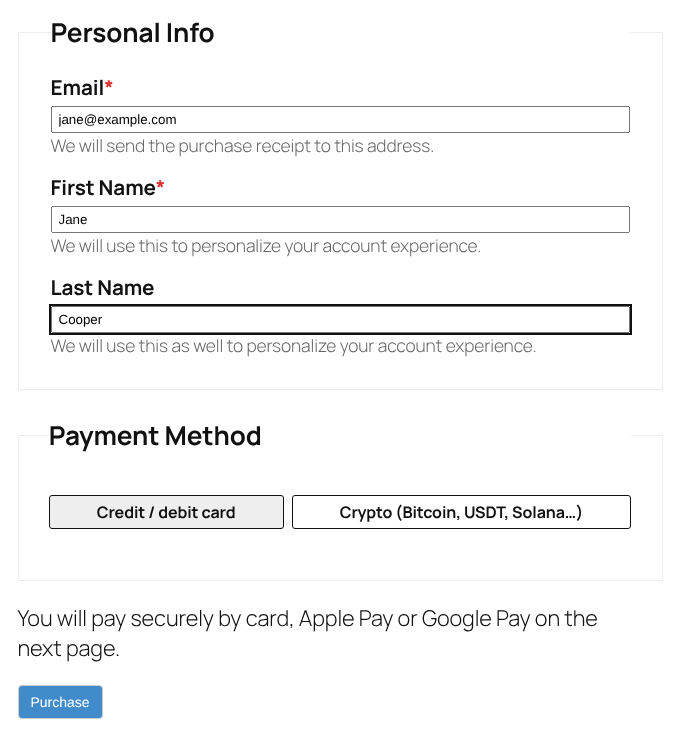
Add a download to the cart and open the checkout. The customer chooses Credit / debit card and clicks Purchase. They are taken to the secure payment page to pay with Visa, Mastercard, Apple Pay, Google Pay and more.
Card minimums range from about $1 to $30 depending on the provider (see the minimums), so test with an amount above the minimum.
The order completes automatically
When the payment is confirmed, the order is marked Completed and Easy Digital Downloads emails the download links as usual. Open the order under Downloads › Orders: it shows the blockchain Transaction ID, and every confirmation is written to the order’s Notes.
| Order | Meaning |
|---|---|
| Completed, note “received … TXID in” | The order was paid. |
| On Hold, note “underpaid” | Less than your fees tolerance arrived. The funds are in your wallet: settle with the customer. |
| On Hold, unexpected token or payout to another wallet | Check the note before releasing the order. Contact support if the payout did not go to your wallet. |
| Note “extra payment” | The order was already completed or refunded, for example the customer paid twice. Refund the customer if needed. |
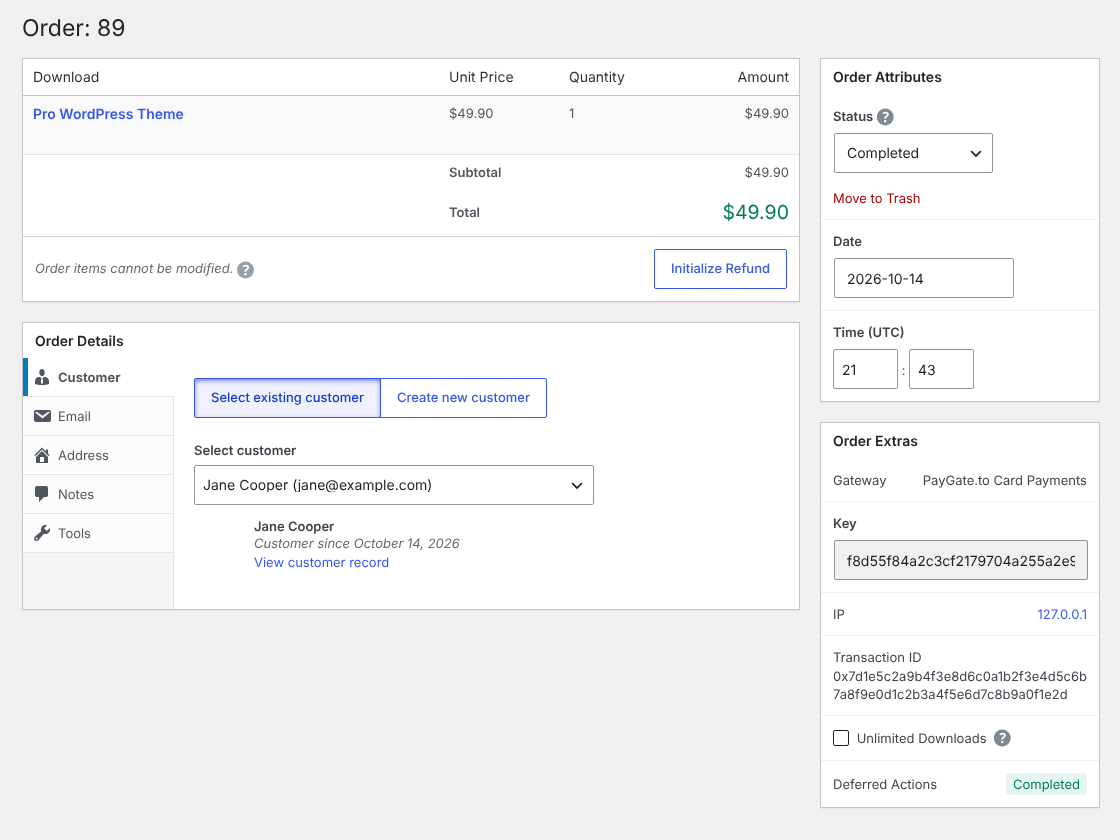
The payout reaches your wallet at the same time. Follow it with the payout tracker.
All settings explained
| Setting | What it does | Default |
|---|---|---|
| USDC (Polygon) wallet for payouts Required | Receives the payouts. | – |
| Provider | Empty = hosted page with every available provider; a provider id = that provider only. | Empty |
| Fees tolerance | Share of the total (in USD) that must arrive: 60%, 70%, 80% or 90%. | 60% |
| Dedicated API endpoint | Your free DDoS-protected API endpoint. | api.paygate.to |
| Checkout domain | Your white-label checkout domain. | checkout.paygate.to |
| Checkout colour, Checkout logo URL | Branding for the hosted page. | Empty |
Troubleshooting and FAQ
The card method is not at checkout.
Switch on PayGate.to Card Payments under Downloads › Settings › Payments › General › Active Gateways and fill in the wallet.
The customer paid but the order is still pending.
Open the order’s Notes. No PayGate.to note means the confirmation could not reach your site: check that WordPress uses its public https address (Settings › General) and that nothing (maintenance mode, a firewall, IP allow-lists, a security plugin) blocks index.php?edd-listener=paygate_card. Otherwise the note says why.
The customer sees "Payment could not be started".
Check the USDC (Polygon) wallet: it must be your own Polygon address starting with 0x. If it is correct, try again in a minute, or set your dedicated API endpoint.
Do I need an account, API key or KYC?
No. Your wallet address is all you need. Never contact or create accounts at any of the payment providers.
What are the fees?
1% plus the provider’s fees, which vary per provider and amount.
Can customers charge back?
No. Payments are final and you will not receive chargebacks.
How do I update the plugin?
Upload the latest zip the same way and choose Replace current with uploaded. Your settings are kept.
Other platforms and next steps
The same card gateway is available for every major platform:
Stuck? Our team replies fast.Send us your platform, a screenshot and the order number if you have one.
Chat with support