


Every coin your customer sends is forwarded straight to your own wallet the moment the payment is confirmed, with no holds, no sign up and no KYC. It works the same in all our plugins and modules: WooCommerce, Easy Digital Downloads, WHMCS, FOSSBilling, Paymenter, OpenCart, PrestaShop and Magento.
What you need before you start
- Magento 2.4.4 or newer: Magento Open Source, Adobe Commerce or Mage-OS, with PHP 7.4 or 8.1 to 8.5. Works with the default Luma checkout.
- SSH access with Composer (recommended), or FTP plus someone who can run
bin/magentocommands. - Magento cron running, and outbound HTTPS from the server (to load the live coin list).
- A wallet address for each coin you want to accept. Step 1 explains which ones.
Prepare your payout wallets
Crypto is forwarded to your own wallet addresses, one for each coin or network you want to accept. Prepare them before you start:
- Bitcoin (BTC): your Bitcoin address (usually starts with
bc1). - Solana (SOL and Solana tokens such as USDC and USDT on Solana): your Solana address.
- Monero (XMR) and Zcash (ZEC): your Monero and Zcash addresses.
- Ethereum and EVM networks (ETH, ERC20, BEP20, Polygon, Arbitrum, Base, Optimism, Avalanche-C): one
0xaddress covers all of them. - Any other coin you want, for example Litecoin, Dogecoin, Bitcoin Cash, Tron (TRC20 USDT) or TON.
Use self-custodial wallets that only you control (Trust Wallet, Exodus, Phantom for Solana, Cake Wallet for Monero, a hardware wallet and so on). Never use exchange deposit addresses, and always paste the address for the right network: a Bitcoin address in the Bitcoin field, a Solana address in the Solana field.
Install the module
Run these commands over SSH from your Magento root folder (the folder that contains bin/magento). Composer is the recommended way because it makes updates easy.
composer config repositories.paygate-crypto vcs https://github.com/paygate-to/Magento-Crypto-Payment-Gateway
composer require paygate/module-crypto-payment:dev-main
bin/magento module:enable PayGate_CryptoPayment
bin/magento setup:upgrade
bin/magento setup:di:compile
bin/magento setup:static-content:deploy
bin/magento cache:flush
setup:di:compile and setup:static-content:deploy are only needed in production mode (add your locales to the deploy command if your store is not in English).
No SSH or Composer? Install manually
- Download Magento-Crypto-Payment-Gateway-main.zip and unzip it.
- Upload the files from inside the
Magento-Crypto-Payment-Gateway-mainfolder toapp/code/PayGate/CryptoPayment/in your Magento folder (create the folders if needed). - Run the same
bin/magentocommands as above, starting withmodule:enable(your host can run them for you).
Open the payment settings
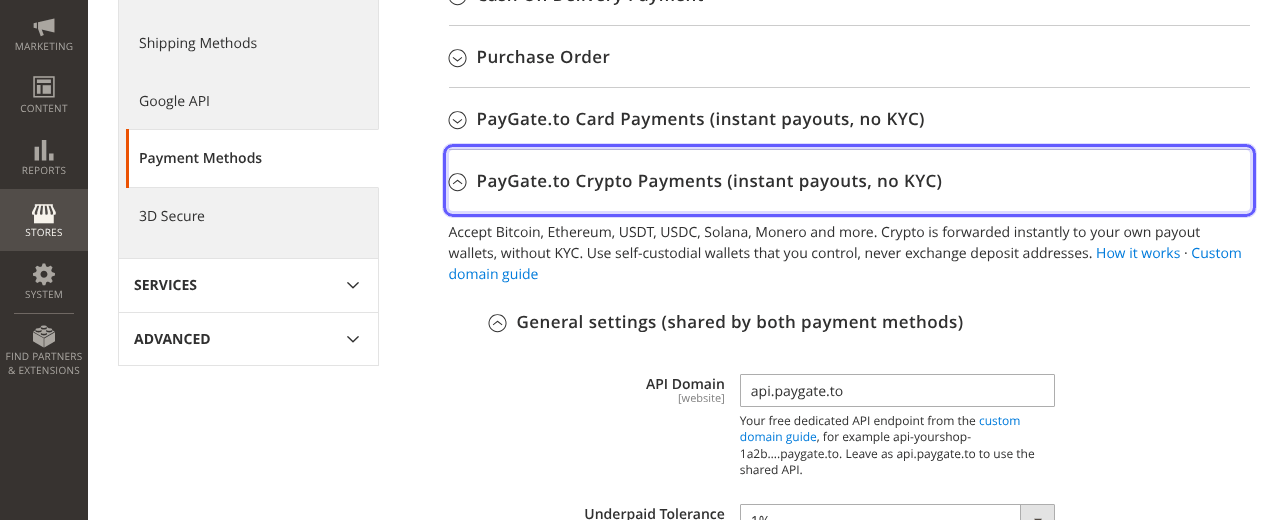
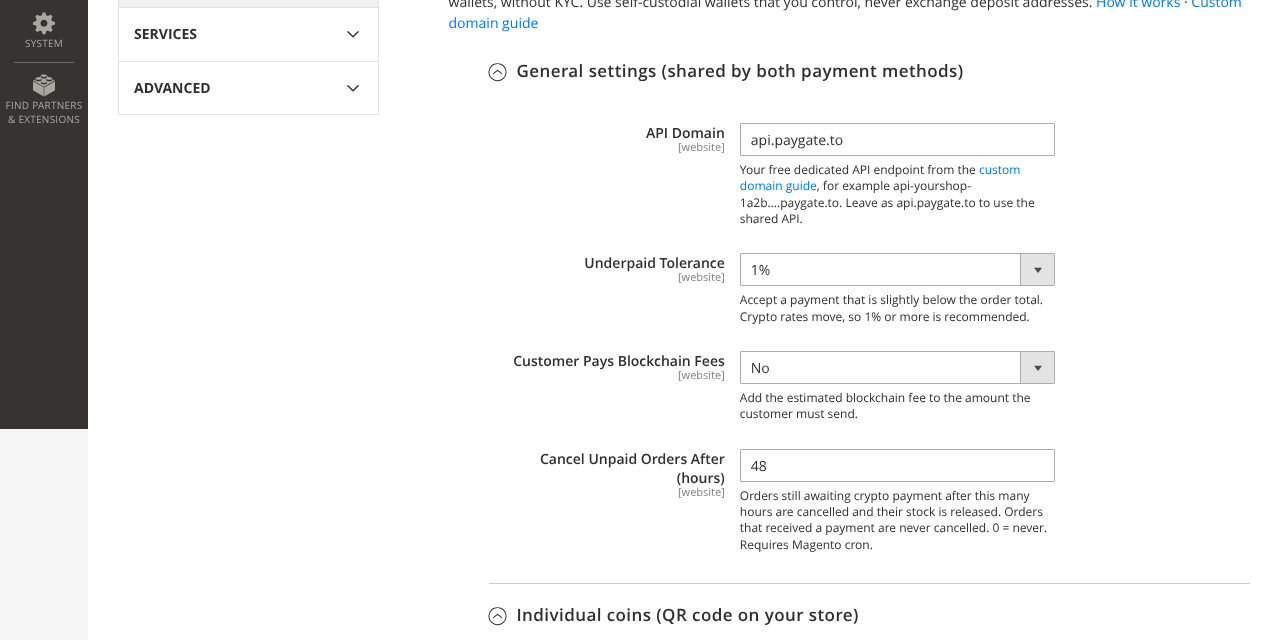
Go to Stores › Configuration › Sales › Payment Methods and expand PayGate.to Crypto Payments (instant payouts, no KYC). The General settings apply to both payment options:
Set up individual coins (QR code on your store)
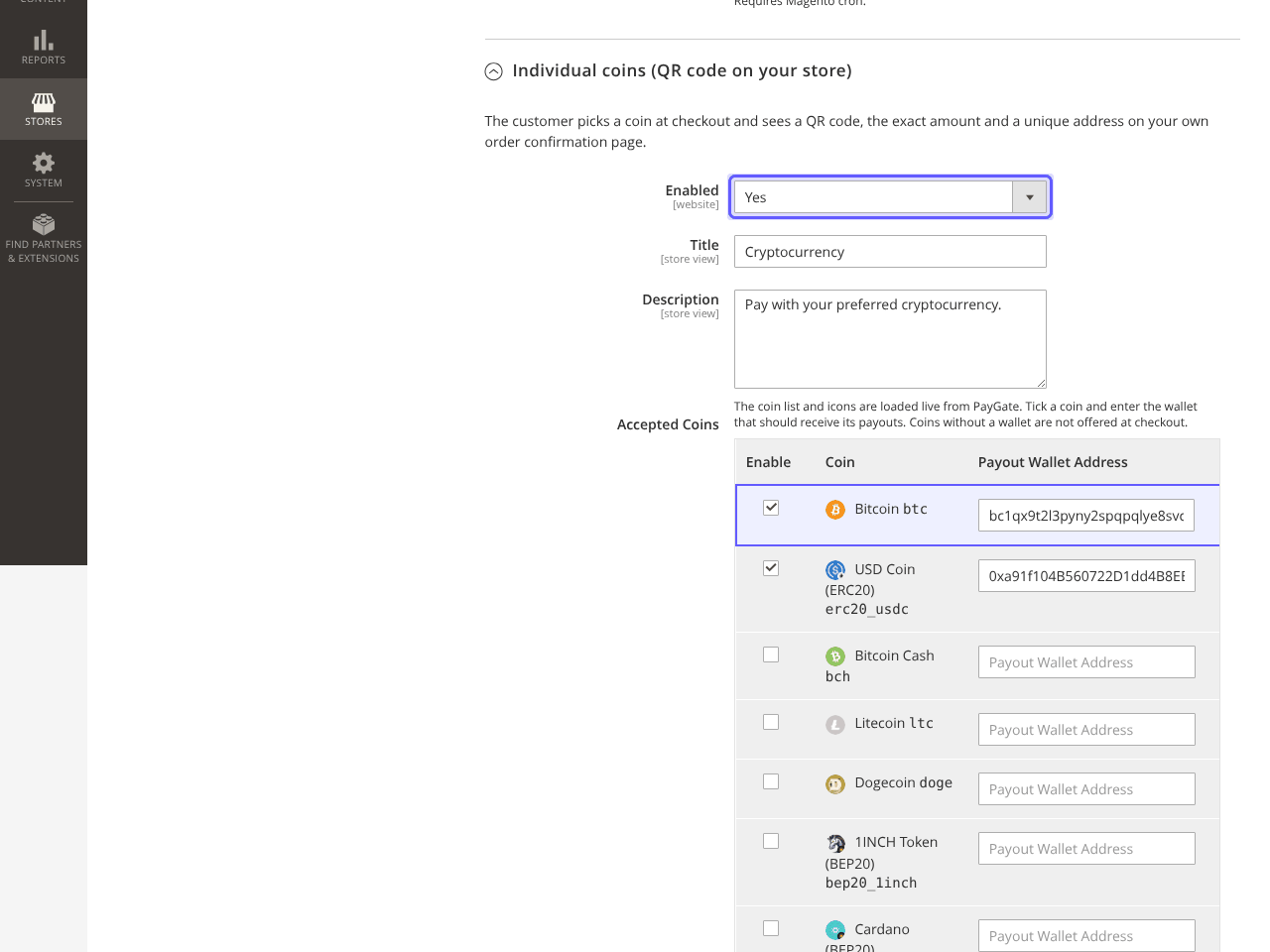
Expand Individual coins (QR code on your store), set Enabled to Yes, then tick each coin you want in Accepted Coins and paste its payout wallet. The list and icons are loaded live from PayGate.to.
Optional: set up Multicoin
Expand Multicoin (hosted checkout, all coins), set Enabled to Yes and fill in one wallet per network:
| Field | Accepts |
|---|---|
| EVM Wallet (ETH, ERC20, BEP20, Polygon, Arbitrum, Base, Optimism, Avalanche-C) | ETH and EVM tokens |
| Bitcoin Wallet (BTC) | Bitcoin |
| Solana Wallet (SOL and Solana tokens) | SOL, USDC and USDT on Solana and more |
| Monero Wallet (XMR) | Monero |
| Zcash Wallet (ZEC) | Zcash |
| Bitcoin Cash, Litecoin, Dogecoin, Tron (TRX, TRC20 USDT), TON | One field each |
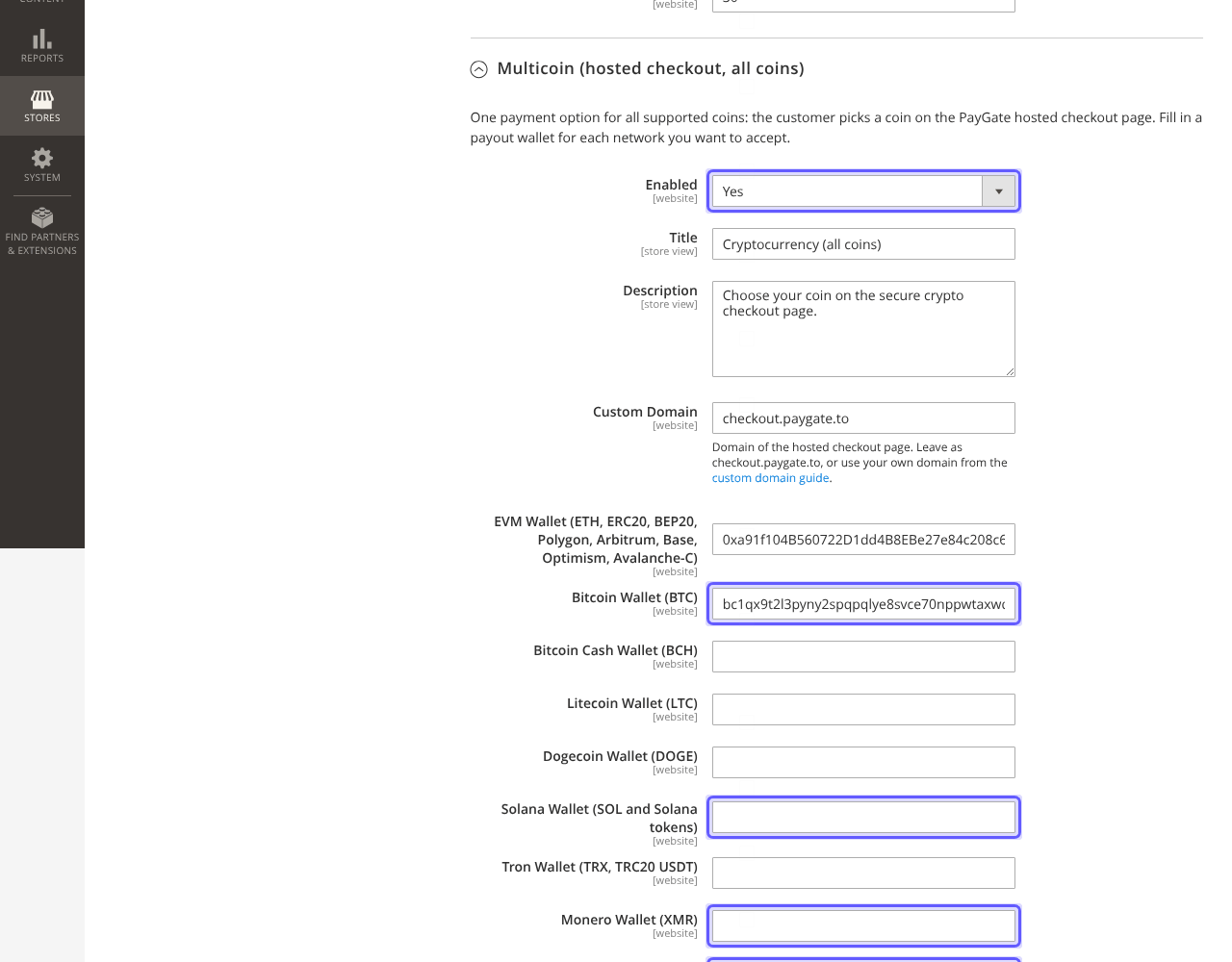
Optionally add a logo and colours for the hosted page and a Custom Domain from the custom domain guide.
Place a test order
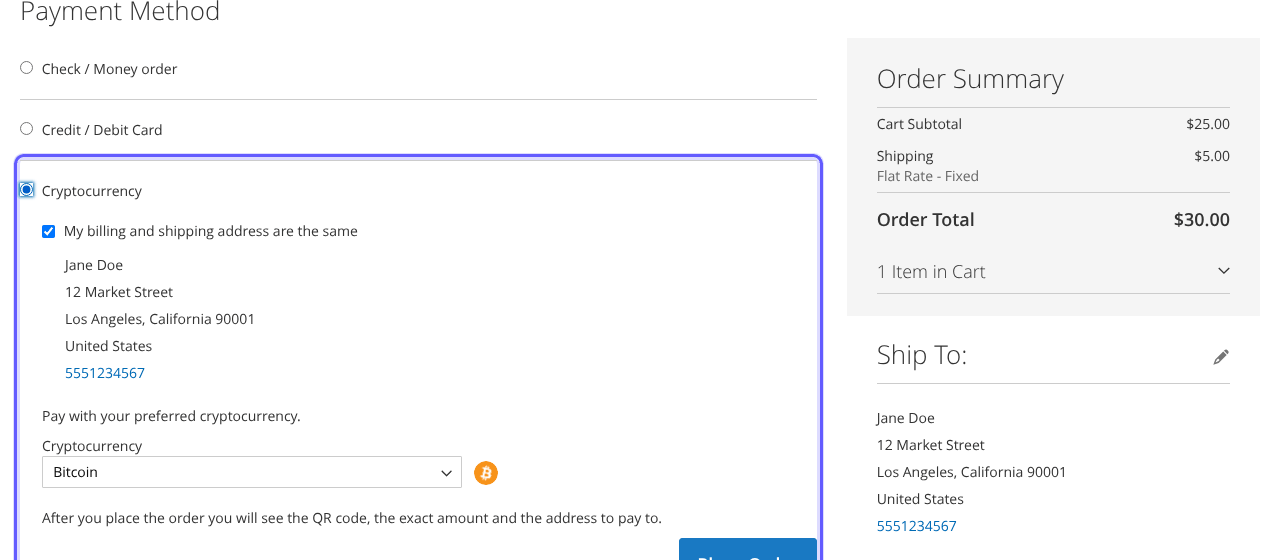
In a private window, add a product to the cart and check out. Choose Cryptocurrency, pick a coin and click Place Order.
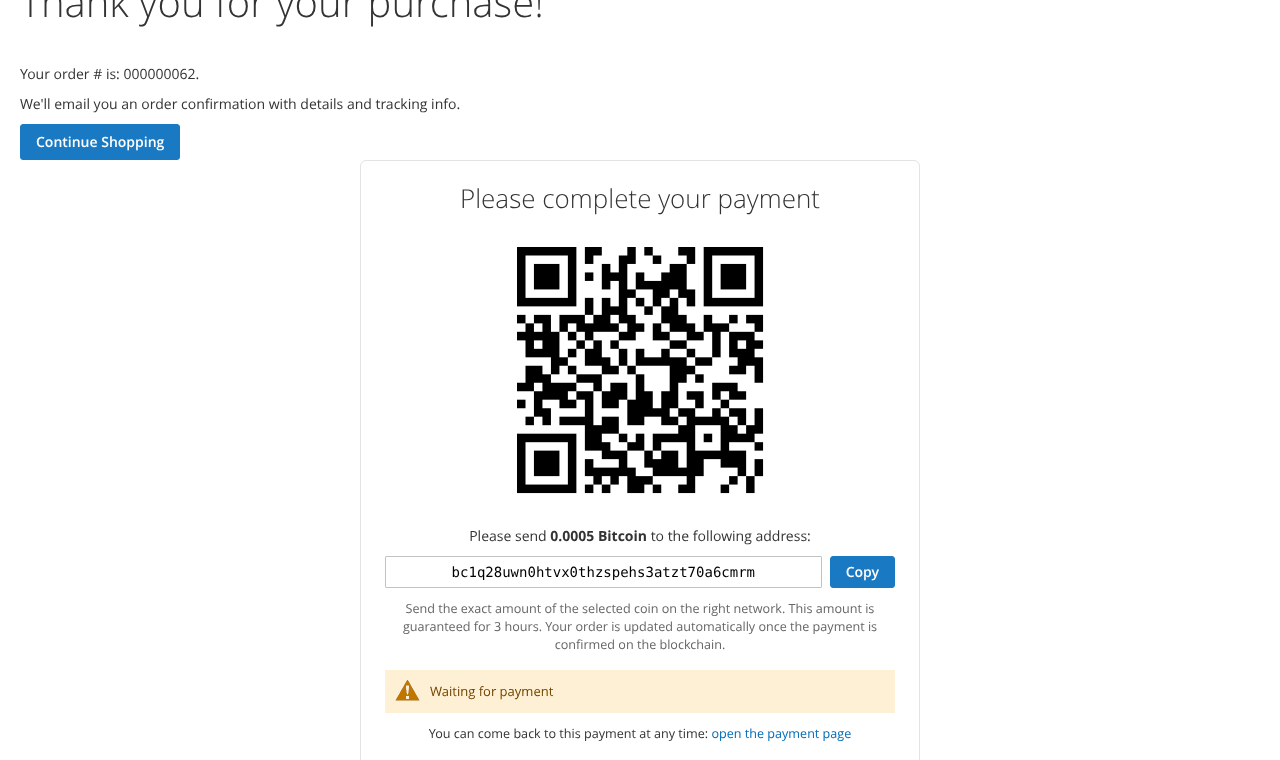
The order confirmation page then shows the payment box on your own store: QR code, exact amount, the address with a Copy button and a live status. The amount is guaranteed for 3 hours, and the order email links back to the payment page.
Each coin has its own minimum; an order below it is not placed and the customer is asked to choose another coin. See the minimum per coin.
The order is invoiced and you are paid out
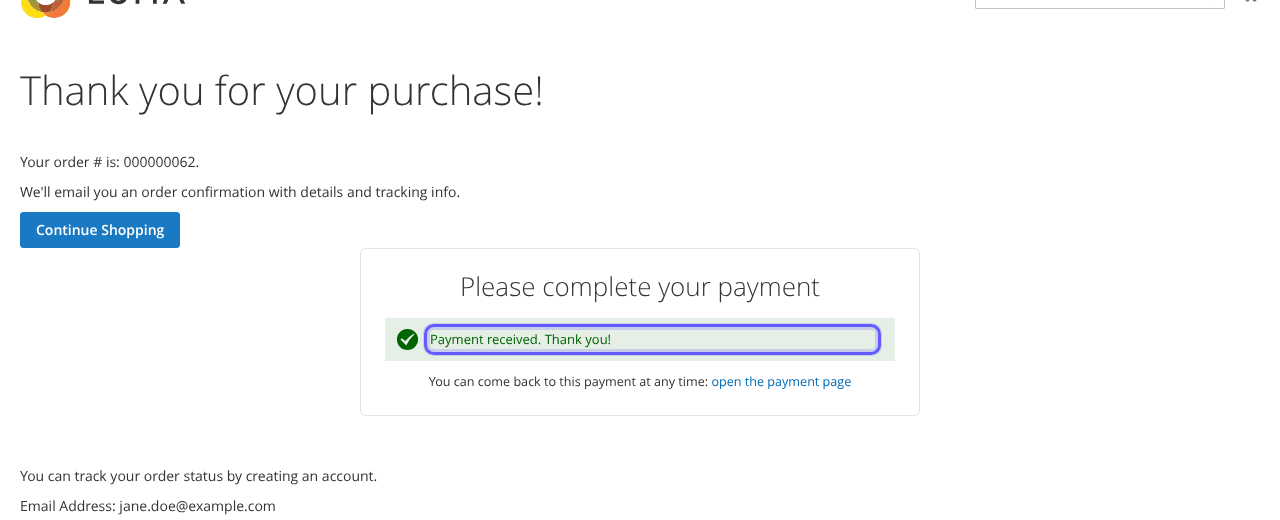
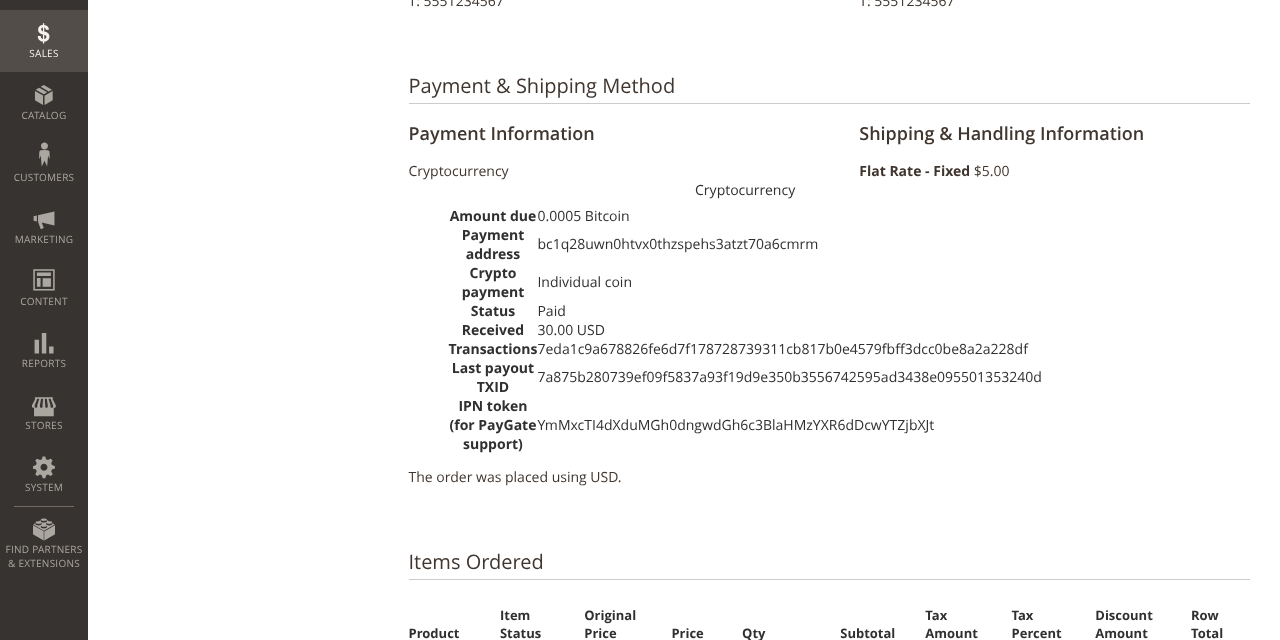
When the payment is confirmed on the blockchain, the crypto is forwarded instantly to your wallet, the payment box shows Payment received and the order is invoiced and moves to Processing.
All settings explained
| Setting | What it does | Default |
|---|---|---|
| API Domain | Your dedicated API endpoint. | api.paygate.to |
| Underpaid Tolerance | Accepts payments slightly below the total (0% to 10%). | 1% |
| Customer Pays Blockchain Fees | Adds the estimated network fee. | No |
| Cancel Unpaid Orders After (hours) | Cancels unpaid orders and releases stock (0 = never). Orders that received a payment are never cancelled. Needs cron. | 48 |
| Individual coins: Enabled, Title, Accepted Coins | QR code payment on your store. | No, Cryptocurrency |
| Multicoin: Enabled, Title, network wallets | Hosted checkout with all coins. | No, Cryptocurrency (all coins) |
| Custom Domain, logo, colours (Multicoin) | Branding and domain of the hosted page. | checkout.paygate.to |
How orders are updated
| Order status | When |
|---|---|
| Awaiting crypto payment | The order was placed and the payment address created. |
| Processing | The full amount was received (within your tolerance); the order is invoiced. |
| On Hold | Less than the amount due. The customer can send the rest to the same address; the order then completes automatically. |
| Canceled | No payment at all after the Cancel Unpaid Orders After time. |
Payments to the same address add up. A further payment on an already paid order is added as a note so you can refund it.
Troubleshooting and FAQ
Is Monero, Zcash and Solana really supported with instant payouts?
Yes. PayGate.to is the only crypto payment gateway with instant payouts for Solana (SOL), Monero (XMR), Zcash (ZEC) and Bitcoin (BTC), in Magento and every other module.
The coin table says it could not load the coin list.
Your server could not reach PayGate.to. Reload in a moment; coins you already set up are kept. If it continues, allow outbound HTTPS to api.paygate.to (or your API Domain).
The crypto method does not appear at checkout.
Set Enabled to Yes and give at least one coin both the tick and a wallet (Multicoin: at least one wallet). Orders can only be placed in currencies PayGate.to prices. Flush the cache after saving.
The customer paid but the order did not change.
The confirmation URL /paygatecrypto/callback/index must be reachable from the internet. On Adobe Commerce with Website Restrictions, allow it and /paygatecrypto/payment/* for guests. Check var/log/paygate_crypto.log.
The customer sent too little.
The order goes On Hold. The customer can send the rest to the same address (for individual coins the payment page asks for it); when it arrives, the order is completed automatically.
What are the fees?
1.5% flat rate plus blockchain fees.
How do I update the module?
Run composer update paygate/module-crypto-payment, then bin/magento setup:upgrade (plus compile and deploy in production) and flush the cache.
Other platforms and next steps
The same crypto gateway is available for every major platform:
Stuck? Our team replies fast.Send us your platform, a screenshot and the order number if you have one.
Chat with support